
Viewing Guide
Download and View on iPhone/iOS Device
Recommended Settings:
- iOS 8 or higher, with at least 500 MB of free storage
- Wi-fi access (data rates apply to cellular-based downloads)
Instructions:
- Copy URL (for download or stream)
- Launch App Store

- Download Mobile VR Station App

- Open Mobile VR Station App
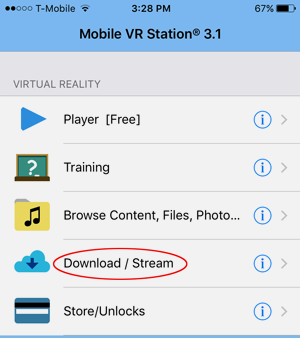
- Click Download/Stream Wizard
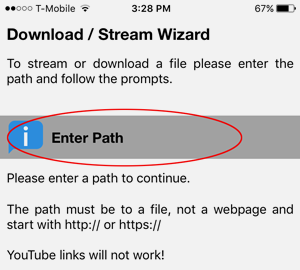
- Click on Enter Path
- Arrive at OK/Cancel box with URL pre-loaded
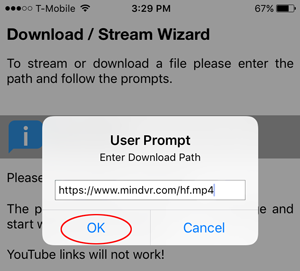
- Click OK
- Scroll to Download Options section and Click Save
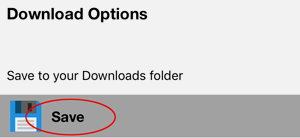
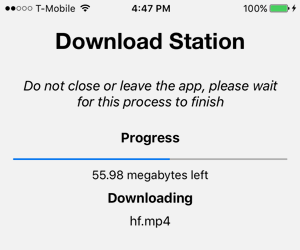
- Wait for Download to complete (can see progress on screen)
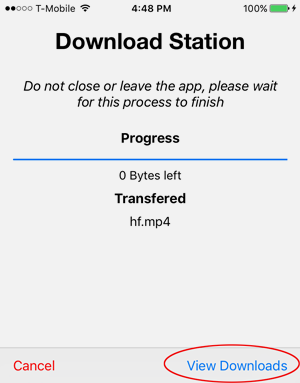
- Click on View Downloads
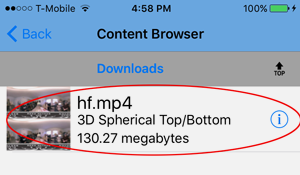
- Click on the Letter "i" Icon on the right of the demo just downloaded

- Click Edit
- Click Playback Type
- Select 3D Spherical Top/Bottom
- Click Save on the bottom right
- Click on demo just Downloaded
- Mount phone into glasses / cardboard or HMD
- Demo will load and play
- Buckle Up & Enjoy!
- Click Download/Stream Wizard